
Gameplay Systems & UI Engineering
Unity • C# • UI/UX • Gameplay Architecture • Systems Programming
This project was developed collaboratively as a team. The following page highlights specific personal contributions to the gameplay and UI systems.
The game will be playable on Itch.io as updates continue.
Overview of Contributions
- Complete Card Upgrade and Selection System
- Polished Card Selection UI with animations, controller navigation
- Modular Upgrade Manager with rarity logic, stat scaling, and deck management
- Persistent anchor visual feedback based on upgrade progression
- Dynamic Player Shield System with unique elemental behaviors
- Modular Main Menu with Audio,video, and Controls sub-menus
- Fully implemented Victory Scene
- Dynamic Credit Scene with auto‑generated scrolling credits
- Polished UI Navigation Manager
- Responsive Pause Menu System
- Customizable Wave System controlling level progression and pacing
These systems work together to deliver a smooth, reactive, and polished player experience.
Card Upgrade & Selection System
Anchorbound features 15 upgrade cards, including 9 multi‑level cards.
Core Features
- Randomized card draws with rarity weighting
- Level‑based stat progression
- Dynamic descriptions showing before → after values
- Temporary blacklist that prevents the selected card from appearing in the next pull
- Automatic removal of max‑level cards
- ScriptableObject-driven data
- Event‑driven UI updates
- Full controller navigation support
Gameplay Flow
- Wave ends → Card Selection UI appears
- Game freezes (
Time.timeScale = 0) - Three cards spawn with flip‑in animations
- Player selects one card
- Selected Card dissolves for visual feedback
- Game unfreezes (
Time.timeScale =1) - UI hides, HUD returns, next wave begins
Technical Highlights
- UpgradeManager.cs
- Tracks runtime levels
- Handles rarity rolls
- Computes stat totals
- Manages deck shrinkage
- Integrates with UI and anchor visuals
- UpgradeDataSO.cs
- Custom description templates
- Auto‑generated stat transitions
- Level‑based value accumulation
- Supports ability type cards
- CardUI.cs / CardIconUI.cs
- Flip‑in animation using
Time.unscaledDeltaTime - Fadeout animation
- Hover scaling and dynamic description preview
- Clean button callback registration
- Flip‑in animation using
Player Shield System (Fire, Ice, Wind)
A complete elemental shield mechanic was developed, featuring unique behaviors for each shield type.
Shield Types and Behaviors
- Fire Shield
- Breaks on hit prevent 1 instance of damage
- Applies knockback to enemies in a radius around the player
- Explosion damage and apply burn status element
- Cooldown for auto‑reactivation
- Ice Shield
- Breaks on hit prevent 1 instance of damage
- Applies knockback to enemies in a radius around the player
- Freezes enemies in a radius
- Cooldown for auto‑reactivation
- Wind Shield
- Breaks on hit prevent 1 instance of damage
- Applies knockback to enemies in a radius around the player
- Increase player movement speed for short duration
- Cooldown for auto‑reactivation
Technical Highlights
- Coroutine‑based cooldowns
- Integration with the player anchor
- ScriptableObject‑driven configuration
Pause Menu System
A robust pause system was implemented to ensure consistent behavior across all input methods:
- Safe gameplay freeze
- Pausing disabled during card selection or death
- Auto‑selects the first button for controller navigation
- Restores cursor lock state properly
- Reliable input map rebinding
- Upgrade icons with hover‑based descriptions
Wave System Integration
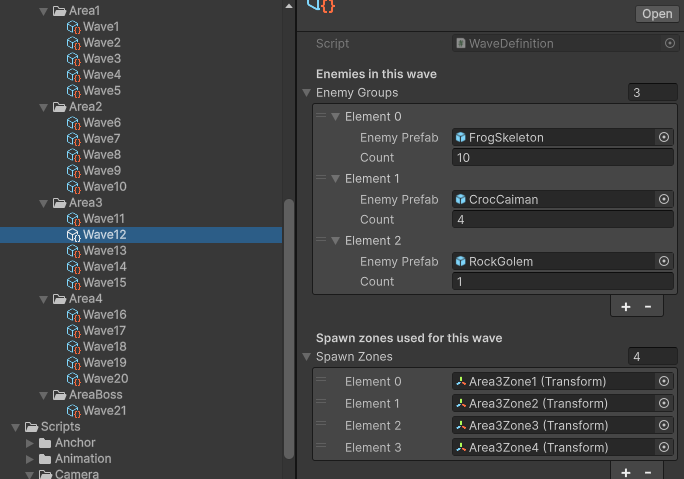
A ScriptableObject‑driven wave system manages progression and pacing:
- Card selection triggered after each wave
- Victory screen triggered after the final wave
- Area‑based wave gating
- Per‑wave definitions for enemy types, counts, and spawn locations
This ensures tight integration between progression, upgrades, and gameplay flow.
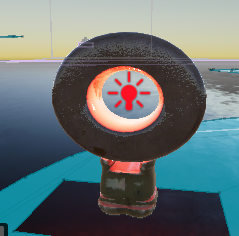
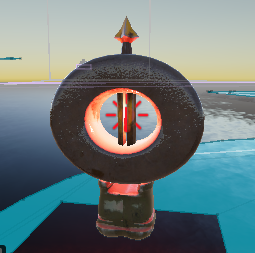
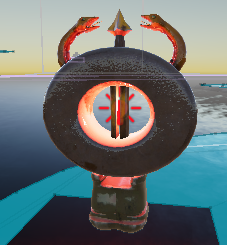
Anchor Upgrade Visual Upgrade
Anchors visually evolve based on upgrade progression:
- Mesh activation at thresholds (5 and 10 upgrades)
- Gold material swap after 15 upgrades
- Event‑driven updates via
OnUpgradesChanged
Main Menu Scene
A structured and responsive main menu was developed to support:
- Scene transitions to gameplay and credits
- Expandable Audio, Video, and Controls sub‑menus
- Clean initialization with hidden sub‑menus
- Controller‑friendly navigation
Victory Scene
A clean, fully integrated victory screen featuring:
- Automatic transition after the final wave
- Victory UI layout and animations
- Controller‑friendly navigation
- Return‑to‑menu flow
Credit Scene
A dynamic scrolling credit scene built with Unity UI and TextMeshPro.
- Automatic generation of credit text from
CreditSectiondata - Custom typography and formatting
- Smooth vertical scrolling using
RectTransform.anchoredPosition - Configurable scroll speed and spacing
- Return‑to‑menu button
Technical Strengths
- Clean separation of systems
- Event‑driven architecture
- Modular ScriptableObject‑based design
- Controller‑friendly UI navigation
- Safe pause logic
- Expandable upgrade and card system
Conclusion
The contributions listed above focus on building core gameplay systems, UI/UX polish, and upgrade mechanics that make the game feel responsive, dynamic, and satisfying. All systems are modular, scalable, and ready for future expansion, whether adding new cards, new elements, new waves, or new player abilities.