
This archery Game was developed under 2 months using Unity with C#
Archery Game – Gameplay & Feature Summary
It is a precision‑based skill game that challenge the players to control direction, angle, and power to shoot arrows at targets randomly place with a score value higher the furthess the target is from the player. The experience blends simple controls with satisfying feedback, dynamic scoring, and cinematic camera transitions to create a polished and engaging mini‑game.
Core Gameplay Loop
Aim
Players adjust three customize intuitive UI sliders parameters to control direction/angle&power. These values directly influence the arrow’s trajectory through physics‑based calculations.
- Direction (‑45° to 45°)
- Angle (0° to 90°)
- Power (0 – 100)
Shoot
Pressing Shoot triggers a bow animation and spawns a new arrow. The arrow receives:
- A forward velocity based on power
- A rotation based on direction and angle
- A dynamic orientation that adjusts mid‑flight to match its velocity (realistic arrow behavior)
Score
Targets spawn randomly inside designated zones, each with its own score value. Players earn points by:
- Hitting the target directly
- Striking special scoring rings, which apply multipliers
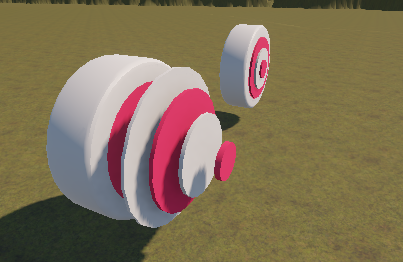
Cinematic Camera
After each shot: The camera follows the arrow in flight. Once the arrow lands or scores, the camera smoothly returns to the player. This adds a polished feel to every shot.
Special Features Worth Highlighting
Dynamic Arrow‑Follow Camera
A camera system attaches itself to the arrow mid‑flight, giving players a cinematic slow‑motion feel without needing complex camera rigs. It’s simple, elegant, and highly effective.
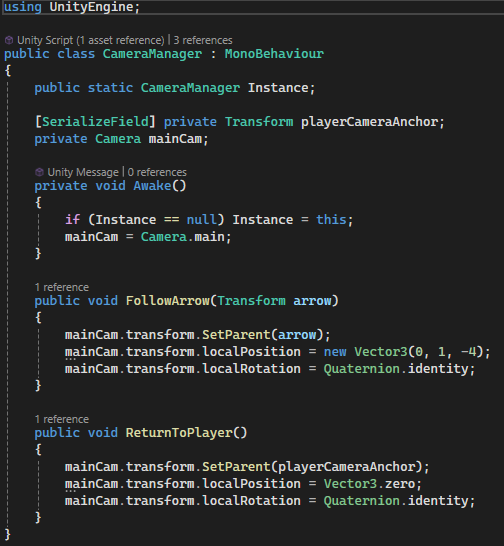
Realistic Arrow Physics
- Rotates to face its velocity vector
- Stops and disables its collider on impact This prevents unwanted physics glitches and ensures clean scoring logic.
Modular Scoring System
Targets and rings are fully modular:
- Each target has a base score
- Rings apply multipliers
- Zones define random spawn positions and score values
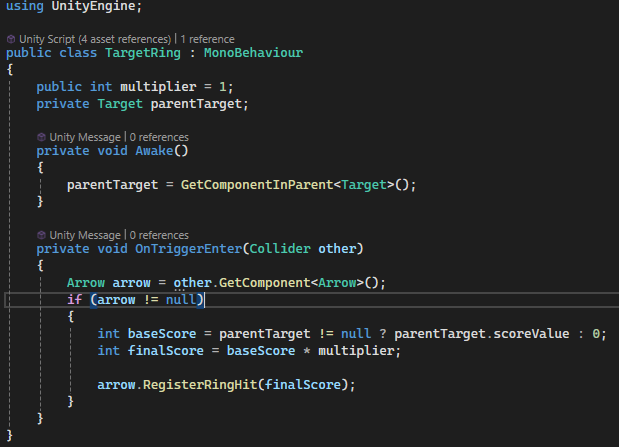
UI Feedback
The UI updates dynamically:
- Arrow icons disappear as arrows are used
- Power and angle values update in real time
- Score screen displays final results automatically
Technical Strengths to Mention
- Event‑driven UI updates (
OnArrowShot) - Clean separation of gameplay systems (shooting, scoring, camera, UI, spawning)
- Physics‑based projectile motion
- Expandable target spawning system
- Safe collision handling (prevents double scoring or ring‑collision conflicts)